01 Jan 2026
jour: An opinionated lab journal
A project report
Years ago I stumbled across a blog post on lab notebooks. The author argues that practitioners in many fields keep a journal where they detail what they’re up to, what’s working and what’s not etc. in their daily work. For some fields such a journal even has legal implications when patents were disputed. In software engineering however, this is not widespread. At the time I read the post I knew of no one who kept such notes.
Sure, we have documentation (maybe), but that’s not the same thing. Documentation is there to explain how a system works, how to interact with it, maybe what constraints it operates under. But documentation typically doesn’t explain how and why we arrived at this particular solution. Did we try to solve the problem in a different way first but failed, leading to the current approach? You won’t find that in the documentation. Old attempts either weren’t committed to the code base or were squashed away.
This blog post opened my eyes to an issue I had at work that I couldn’t even put my finger on before. In my current project at work, I often run into situations where we’re reevaluating a design decision from two years ago because someone thought of a better way to do it. Inevitably, no one remembers why it was built the way it is. But I would often have this nagging feeling that we considered the proposed solution back then but decided against it for reasons. Now the big question (possibly worth weeks of effort) is whether we just didn’t think of it back then or whether we’re missing the reason now for why we didn’t do it. Or, some surrounding factor changed in the meantime, now enabling the better approach. If I had kept notes on my attempts, failures, assumptions etc. I could simply read up on this now and we would have clarity. Alas, those notes don’t exist.
Naturally, I resolved to start a lab journal. But instead of using my usual notes app, I had the feeling I needed something more specialized for the occasion. An application that would keep entries in a chronological feed, rather than siloed notes. Enter jour, a simple web app for keeping journal entries with no hassle. It’s local-first with optional S3 sync. A hosted version is available at jour.rest.quest. As you can tell by the URL, this application is another instance of my local-first series kicked off by rest.quest. I would recommend reading that project report first for the technical details, here I will only go into the feature set and learnings from this project.
Features
If you’ve seen the project reports for rest.quest or go
you know the drill by now: Brutalist, minimalist UIs are my jam. Below is the default view of jour,
a complete feed of every entry I’ve written in reverse chronological order. Each entry has a text
body, some tags and a date. The tags are parsed out of the content when submitting an entry simply
by looking at words starting with a # in the last line. Tags do not get special treatment other
than being displayed in a lighter tone below the content.
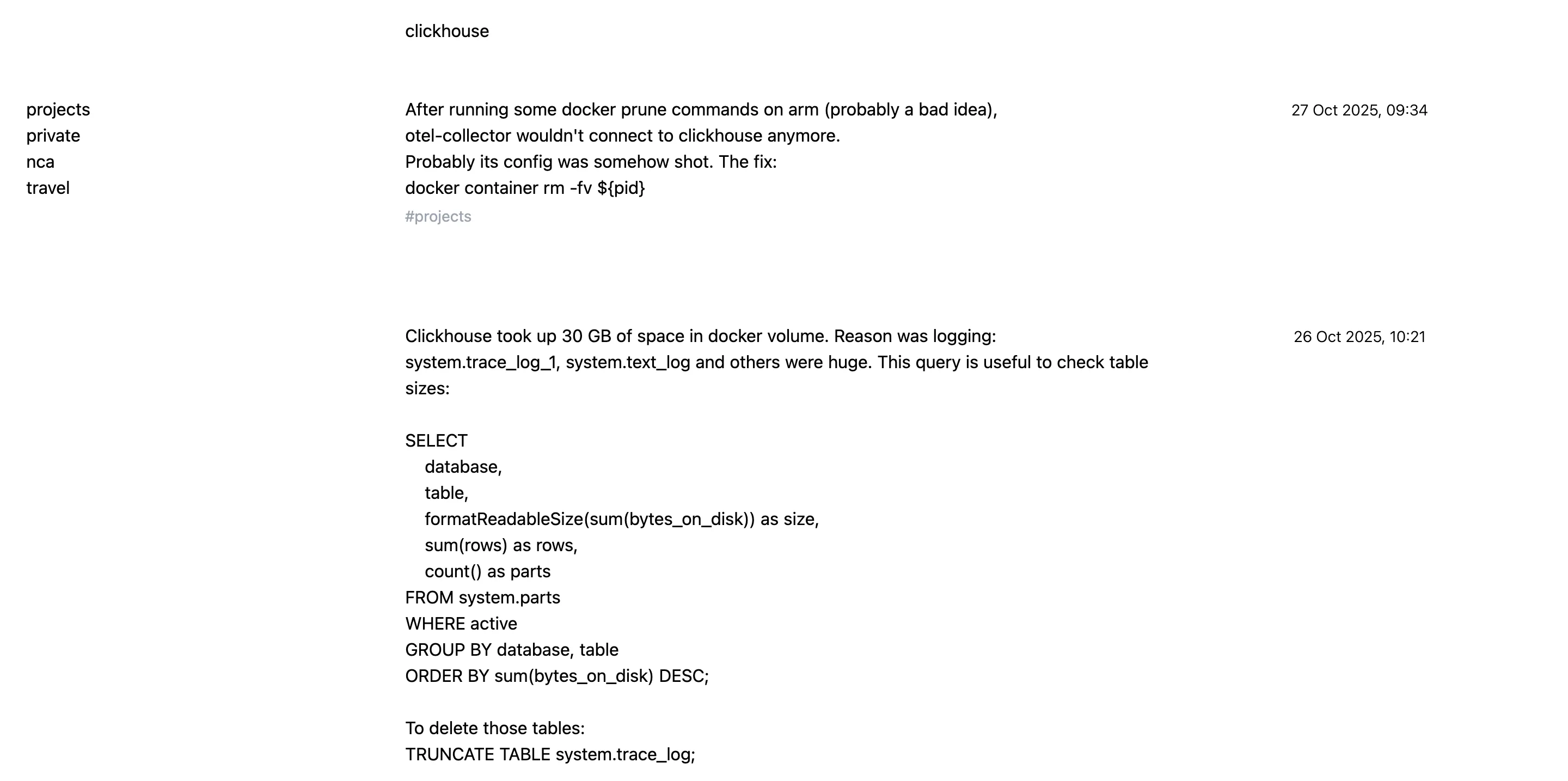
On the top, there is a search bar that searches through all entries and filters down the feed
accordingly. I started using this application a while ago and was quite satisfied with it. The one
gripe I had was that when I was writing entries at work, I wanted to automatically have the entries
tagged by a special tag (nca in my case). Instead of always having to type out this tag manually,
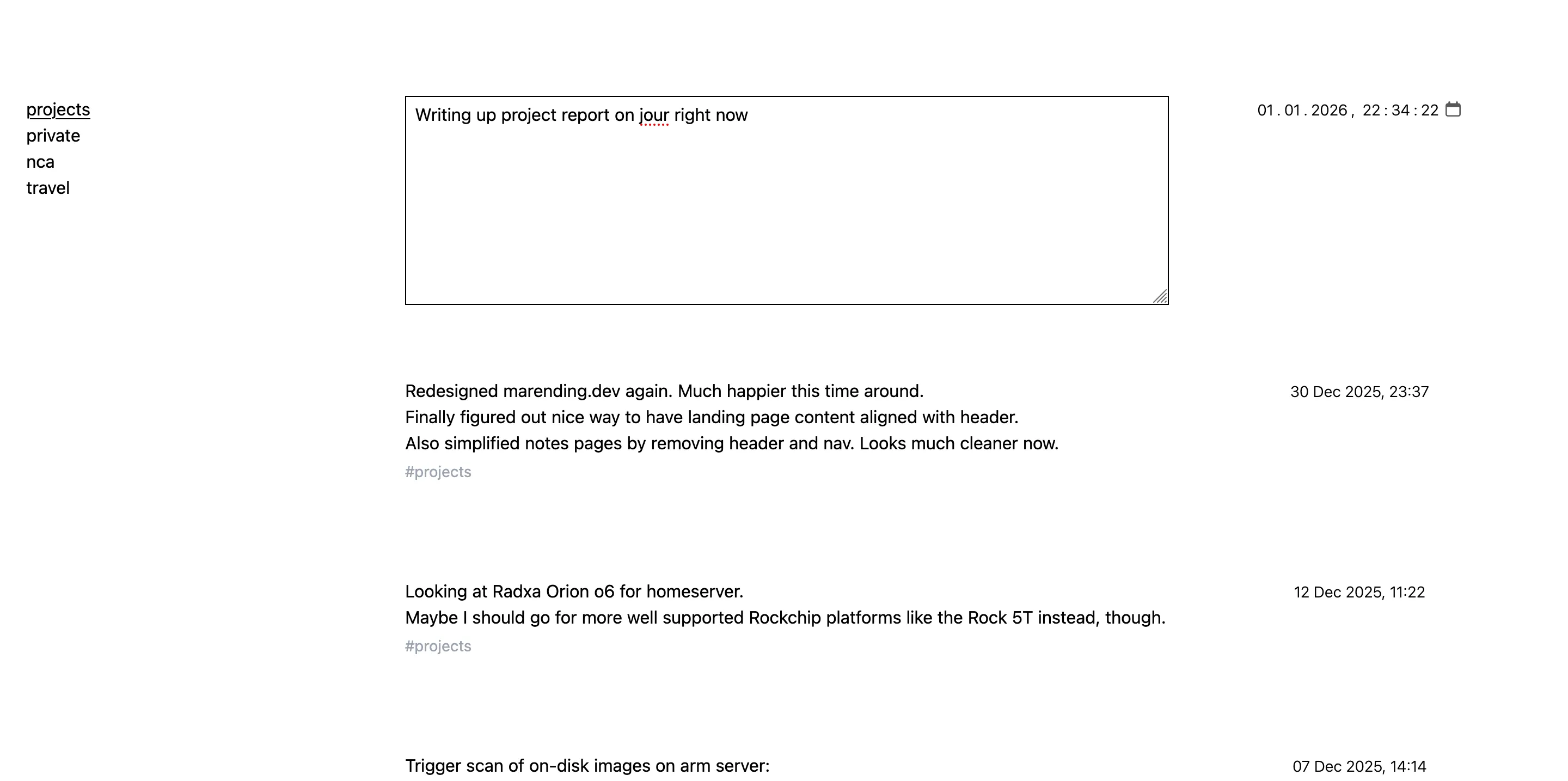
I later added the things you see on the left. When clicking on nca, there is an implicit filter
for this term that doesn’t show up in the search bar, and every new entry automatically gets tagged
correspondingly. These “autofilters” can be created via shortcuts and deleted via a button that is
revealed on hover.
Next, by hitting n, a new entry is created at the top with a textbox and a date picker. By default
the datepicker shows the current date and time, but I quickly found that sometimes one wants to
create entries in the past, so I added the ability to set the date. With cmd+Enter the entry is
saved.
That’s pretty much the functionality that I use every day. One additional bit of eye-candy I added later is a statistics screen that can be toggled. It shows a GitHub-style heatmap of all entries laid out over time.
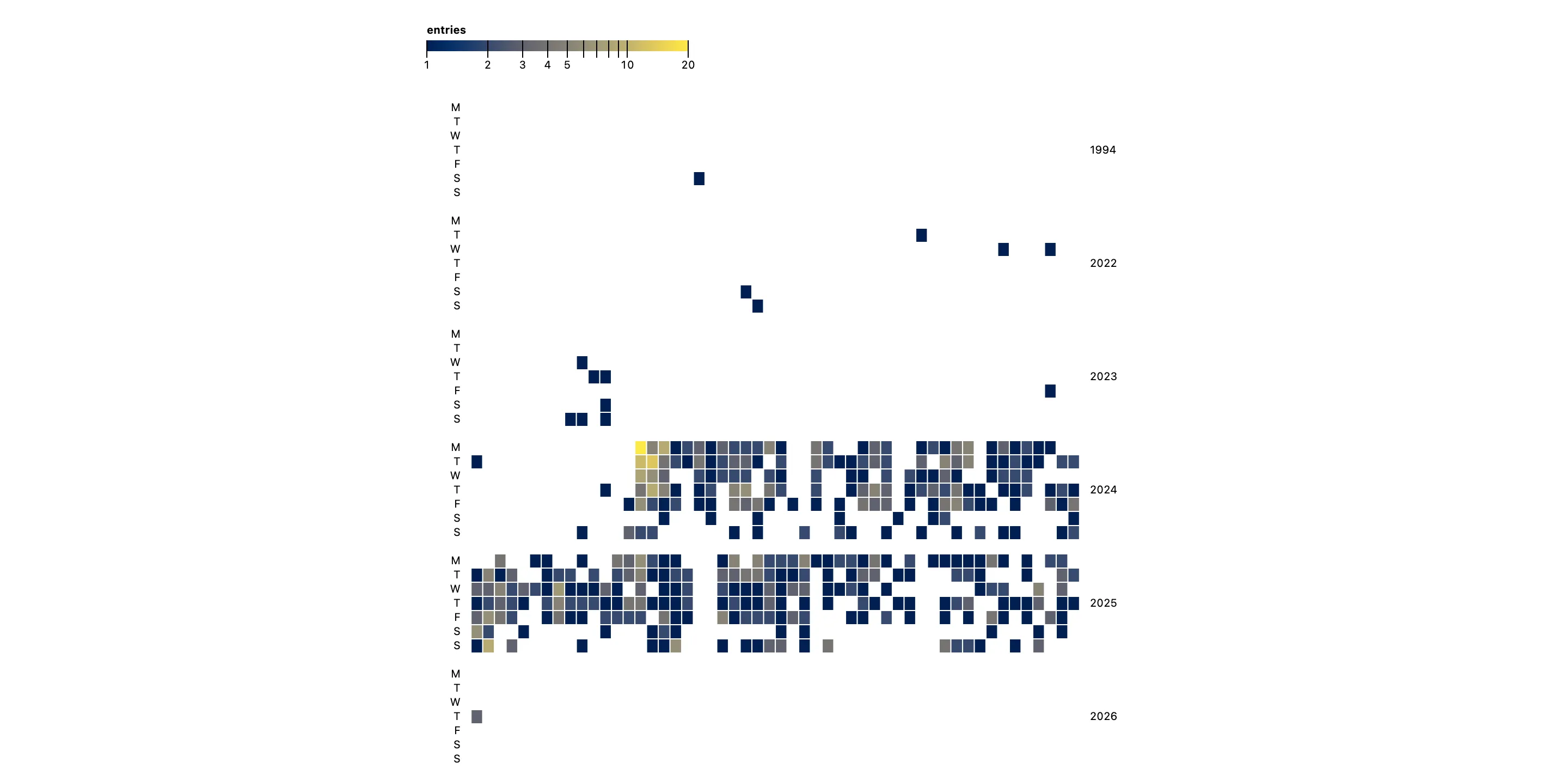
Here you can see that I’m quite consistent in using jour. The week(s)-long gaps are almost always vacations.
At the time of writing there are 848 entries saved. Many of them quite short, some are longer. There is no progressive loading of entries, everything is shown on one page. Turns out you can go quite far with such a simple UI when you build it to your specifications. If the sheer number of entries grows to a point where this becomes laggy, I’ll reconsider.
Learnings
Technologically, jour is nothing to write home about. It’s a slight variation of my rest.quest-winning-formula. That’s also the reason I could build this out in a mere couple of hours. The interesting learning for me in this project is more in the direction of disjoint, use-case-specific applications vs integrated multi-purpose apps. At first, I was very happy with my new-found trifecta of productivity applications: jour as a lab journal, rest.quest as a todo list and fieldnotes as the notes app. Over time, I started noticing an indecisiveness about where to record some things. For instance, after figuring out a shell one-liner to fix an issue I was experiencing, I wouldn’t know whether to jot this down in the lab journal or as a new note in the notepad. Or taking notes on what’s being discussed in a sync meeting to refer to later. Dedicated note or quick entry in jour?
This conundrum has kicked off thoughts I can’t fully verbalize yet. In classical me fashion, one option in the room is to build an integrated application that allows bringing all this data together. But then again, moving away from single-purpose, focused applications to bloated monoliths doing too many things badly is not exactly a mistake I want to repeat. We’ll see where this goes.